Messaging / operator workspace
Conversation panel
10,284conversations in this example
All your conversations in view
Select a label to see where it is on the panel.
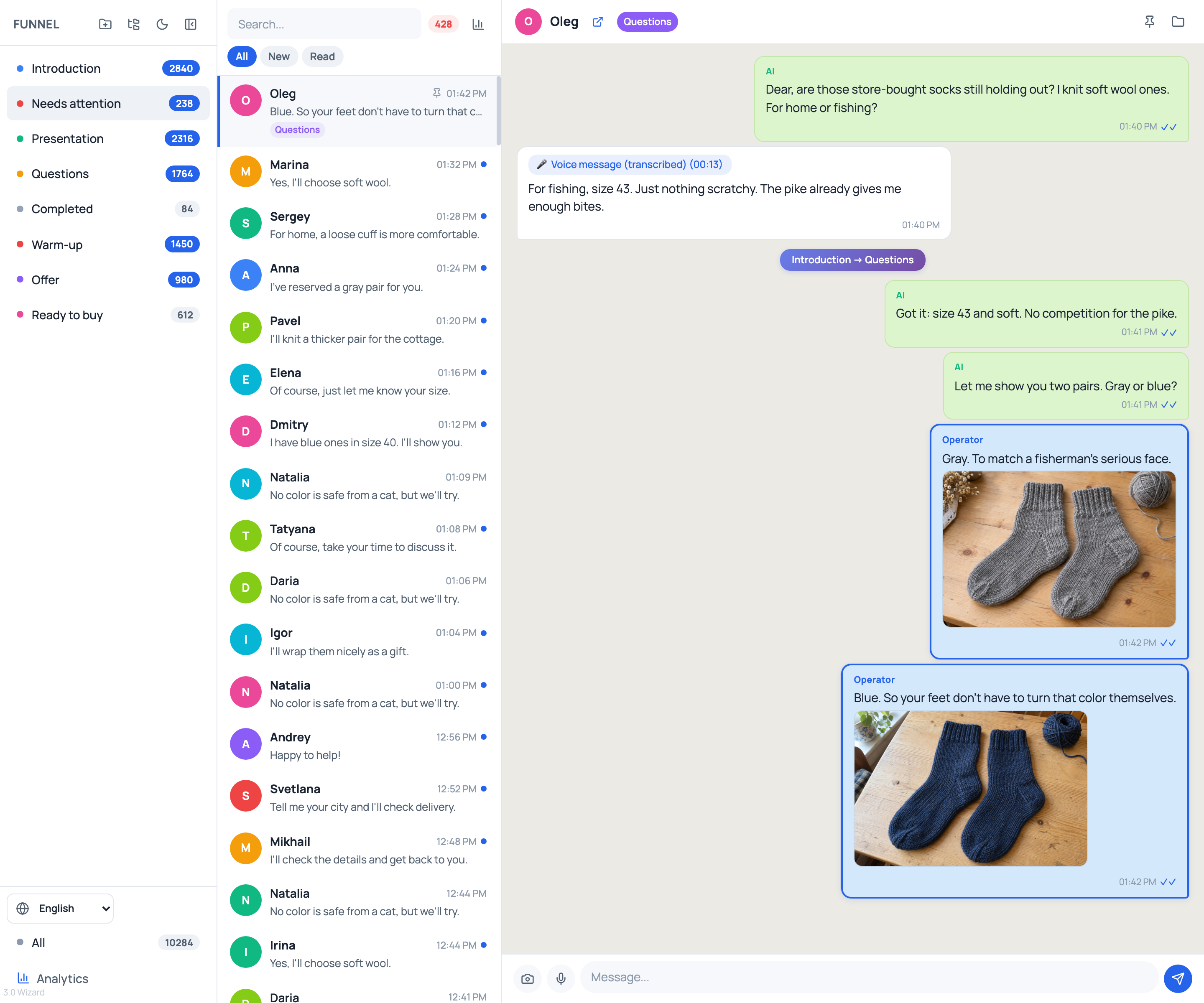
How to read this screen
From the full list —
to one person.
Each numbered label opens the corresponding area of the full screenshot.
Folders and stages
Eight top-level folders: six stages, “Needs attention” and “Completed”.
- Introduction, Presentation, Questions, Warm-up, Offer and Ready to buy. Open a folder to see its conversations.
- After a manual message is sent, the operator takes over the conversation. AI no longer replies automatically. Oleg’s conversation is already here.
- The total number of accumulated conversations in the eight folders. Completed conversations are included too.
Make it your own
- Adds a new folder to organize your conversations.
- Adds a subfolder inside the currently selected folder.
- Switches between the panel’s light and dark themes.
- Makes room for the list and conversation. You can expand the column again.
Find the right person
- Finds a person so you can open their conversation.
- Shows the number of conversations with unread messages.
- Filter the list by what you have read in the panel. “New” keeps conversations with unread incoming messages.
What happens in the conversation
Grandma Zina sells wool socks. Oleg is the buyer, choosing soft socks in size 43 for fishing.
- With transcription connected, you can read Oleg’s voice message right in the conversation.
- After the voice message, AI asks follow-up questions on Zina’s behalf: first about size and softness, then about color. These are two separate text messages.
- The operator then joins in and sends gray and blue socks as two separate photo messages.
- A service entry in the conversation shows a transition between funnel stages.
Conversation actions
- The link next to the name opens the person’s contact in Telegram.
- The pin keeps the entire conversation pinned in the conversation list.
- Moves the conversation to the selected folder.
Reply yourself
- The camera lets you select and send one photo at a time.
- The microphone records your voice. After stopping, you can listen to the recording and send it. The browser needs microphone access.
- The text field for the operator’s message.
- The arrow button sends the typed reply to this conversation.
Open analytics
Two ways into the same window. Below are its full screenshot and explanations of the metrics.
- The “Analytics” button at the bottom of the funnel column.
- The chart icon next to search opens the same analytics window.
The funnel in numbers
Inside analytics
Where people are,
what they have read and how they progress toward the goal.
Funnel analytics
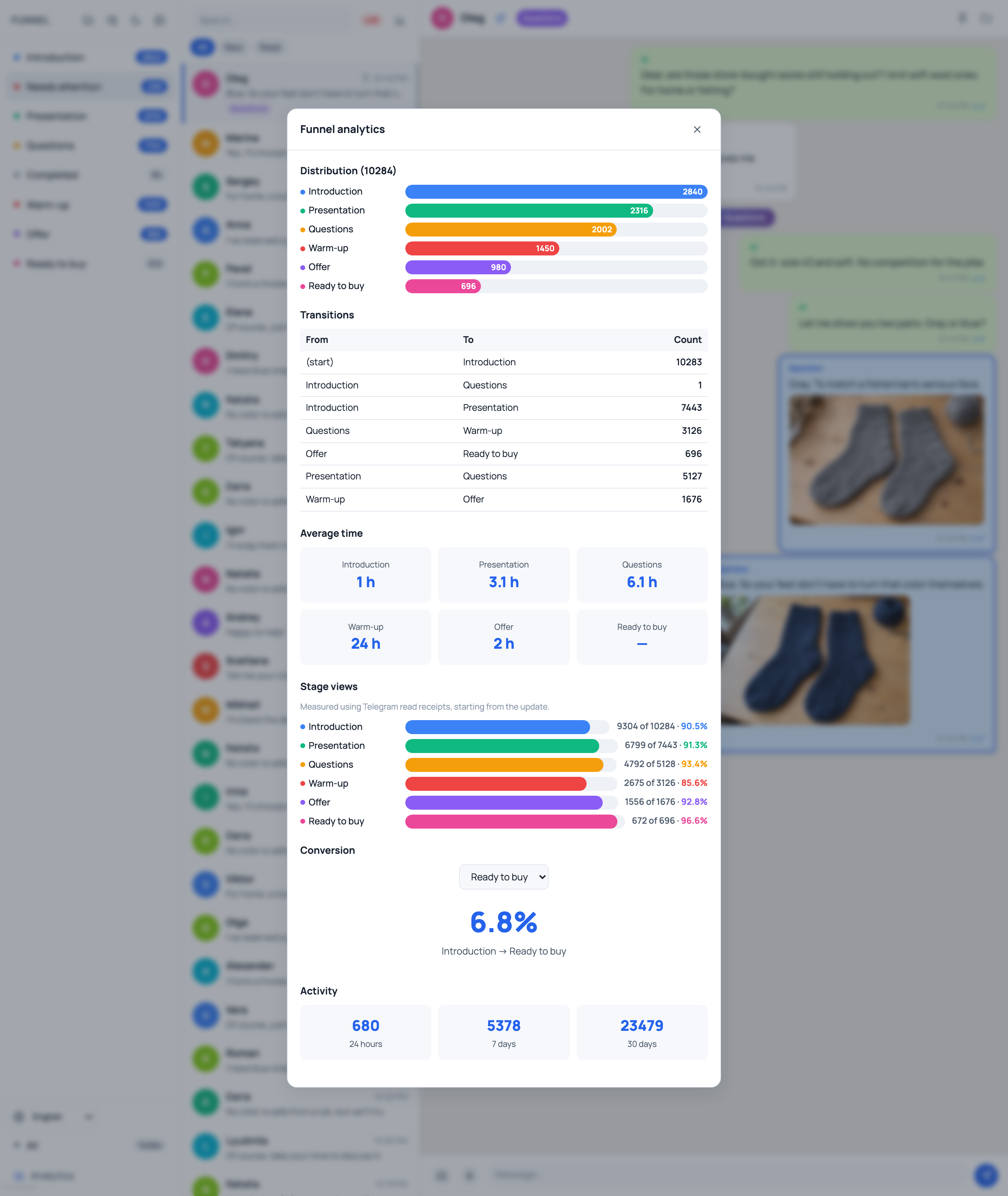
- Distribution
- How many conversations are at each stage now. The total counts unique conversations containing messages.
- Transitions
- Where people moved from and to, and how many transitions occurred.
- Average time
- The average time spent in a stage, based on completed passages through that stage.
- Stage views
- How many unique people read a stage’s messages out of those who received them. Based on Telegram read receipts.
- Conversion
- Compares the number of conversations at the goal with the first stage and exits from it. The goal in the screenshot is “Ready to buy”.
- Activity
- The number of transitions between stages over 24 hours, 7 days and 30 days.
Folder and stage are separate attributes. Oleg’s conversation is already in “Needs attention”, while its stage remains “Questions”.